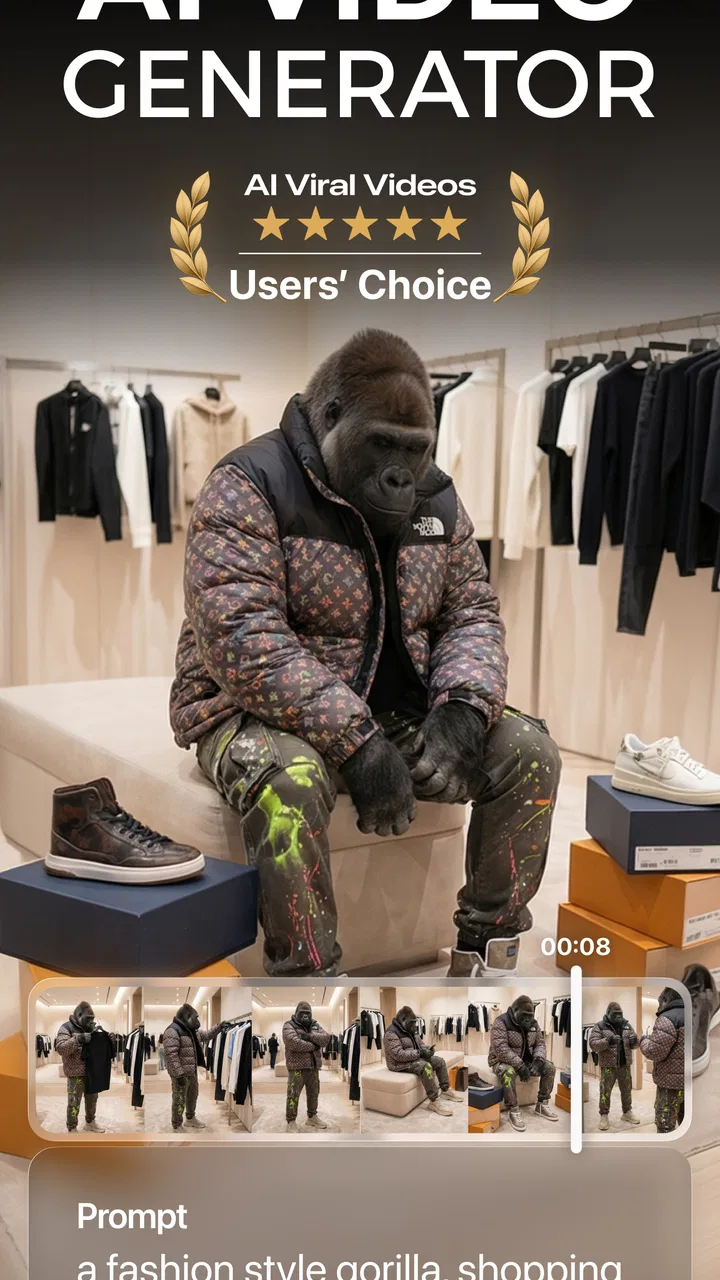
AI Video - AI Video Generator
- 4.5
- Rating
- 10.00M
- Installs
- Free
- Price

 Analysis by App-foxy
Turning an idea into a video usually sounds easier than it is. I can imagine a scene, write a short script, or describe a mood in a few words, but transforming that thought into something watchable often means dealing with timelines, clips, music, captions, and editing tools. AI Video - AI Video Generator takes a different route: I describe what I want, then let the app create a video from that prompt. That makes it interesting for quick visual experiments, social posts, and anyone who would rather begin with words than with an empty editing screen.
After spending time with this photography app from HubX, I see it as a fast idea-to-video tool rather than a complete replacement for a traditional editor. Its appeal is immediate: the first step is writing, not importing footage. The trade-off is just as important: an automatically generated result may need correction, refinement, or a second attempt before it feels ready to share. If you understand that balance, it becomes much easier to decide whether this is the right app for you.
What to consider before choosing an AI video app
The most useful question is not simply whether an app can generate a video. I would first ask what kind of video I need. A person making a quick visual for a personal post has different expectations from someone preparing a polished product presentation, a precise tutorial, or a repeatable brand campaign. AI Video - AI Video Generator is most appealing when the concept matters more than exact control over every frame.
You May Also Like

 Google Keep - Notes and lists
Google Keep’s Quiet Growth Shows the Appeal of Simpler Notes
As mobile work gets busier, Google Keep keeps winning a simple contest: capture a thought quickly, find it later, and get on with the day.

 Blood Strike: 2.5 Anniversary
Blood Strike’s Loadouts Turn Every Drop Into a Tactical Gamble
A close look at Blood Strike’s custom loadouts: how fast access to signature weapons reshapes its battle royale rhythm, rewards preparation, and narrows the gap between fights.

 Pandora - Music & Podcasts
Pandora’s Music Is Easy to Start, but Harder to Recover
Pandora’s strength is its low-effort path from a seed to a station. Its weak spot is how much confidence it asks you to place in connection, setup, and quiet recovery.

 8 Ball Pool
 Is Built on Rivalries, Rematches, and Routine
A close look at the rivalries, rematches, shared routines, and unanswered safety questions that turn a quick pool match into a persistent mobile community.

 Samsung Music
’s Quiet Strength Is Playing What You Already Own
Its reach comes less from spectacle than from dependable access to a personal library. That simplicity is both the app’s strongest retention engine and its ceiling.

 AccuWeather: Weather Radar
AccuWeather Review: A Quick, Clear Forecast for Everyday Decisions
For everyday plans, the best forecast is the one you can understand quickly. AccuWeather makes rain timing, radar, and local conditions easy to act on, with a few trade-offs.
More From Our News Desk



I also look at how much work I want to do before and after generation. With a conventional mobile editor, I choose the footage, trim it, arrange it, and decide exactly where every transition appears. That takes longer, but the result is predictable. With a text-driven generator, the beginning is quicker, while the review stage becomes more important. I need to inspect whether the visuals match the wording, whether the movement feels natural, and whether the finished clip communicates the intended idea.
Another practical factor is patience. A short prompt can be written in seconds, but good results often come from improving the description rather than accepting the first output. I found that clear instructions about the subject, setting, atmosphere, and action are more useful than vague requests such as “make something cool.” The app is therefore not a magic button; it rewards users who can describe a visual idea clearly.
The app is free to install, which makes trying the workflow straightforward. It carries a Teen content rating, and optional purchases are listed from $4.99 to $69.99 per item. I would treat that pricing structure as a reason to explore the free experience first and only spend money after deciding that the generation style suits my needs. The current version is 2.6.7, and it runs on Android 7.0 or later.
My first impression of the text-to-video workflow
The strongest part of the experience is the change in starting point. Instead of asking me to find suitable footage, the app asks me to form an idea in language. That feels especially useful when I have a concept that would be difficult to film, such as a dreamlike landscape, a stylized city scene, or a visual metaphor for a short message.
I recommend writing the prompt in layers. I start with the main subject, add the place, then describe the movement and the overall tone. For example, a prompt about a cyclist is more useful when it explains the road, the time of day, the camera feeling, and the desired atmosphere. This does not guarantee a perfect result, but it gives the generator more direction and makes later revisions easier to judge.
A less obvious benefit is that the app can help me test an idea before investing time in a full edit. If I am unsure whether a concept works visually, generating a rough interpretation gives me something concrete to evaluate. That is valuable for brainstorming, storyboarding, and deciding whether a social post deserves more effort.
The workflow also changes how I think about editing. With ordinary camera apps, the creative decision comes first and the recording follows. Here, the description is part of the creative process. Small wording choices can change the mood or emphasis, so I keep the prompt focused instead of adding every possible detail. Too many competing instructions can make the intended subject less clear.
Where this app is particularly useful
AI Video - AI Video Generator works best for short, attention-grabbing concepts that do not depend on documentary accuracy. I can imagine using it to create a visual background for a personal announcement, a mood clip for a playlist, a quick concept for a fictional scene, or a simple social post when I have no suitable camera footage. It is also useful for people who are curious about generative video but do not want to begin with a complicated desktop application.
One realistic everyday scenario is planning a weekend event. I might write a short description of a warm evening gathering, generate a visual atmosphere, and use the result as inspiration for a post or invitation. I would not rely on the generated clip to show exact venue details, but it could communicate the feeling I want much faster than searching through stock footage.
Another good use is early-stage creative work. A small business owner could use the app to explore several visual directions for a seasonal message before choosing one to produce more carefully. A student could use it to illustrate an abstract idea in a presentation, provided the generated imagery is clearly treated as illustrative rather than factual. In both cases, the advantage is speed of exploration rather than final-production precision.
The app can also be helpful when I have an imaginative idea but limited filming options. A phone camera can capture what is in front of me; a text-to-video tool can attempt scenes that are expensive, impractical, or impossible to record. That creative freedom is the main reason I would keep it installed.
Three practical techniques that improve the experience
First, I separate the subject from the style. Instead of mixing everything into one long sentence, I describe what should appear and then explain how it should feel. This makes it easier to identify what needs changing after a result is generated. If the subject is right but the mood is wrong, I can revise the atmosphere without rewriting the entire concept.
Second, I create variations by changing one important element at a time. I might keep the setting and subject while changing the time of day, camera mood, or level of realism. This is more useful than replacing the whole prompt repeatedly because it shows which creative choice is affecting the result. It also prevents me from losing a promising direction.
Third, I judge the video as a sequence, not just as a still image. A striking opening frame can hide awkward movement or an unclear ending. I watch the complete result with the sound off and ask whether the action is understandable without explanation. If the clip is intended for a social post, I also consider whether the first moment communicates enough to make someone keep watching.
These habits reveal an important trade-off. The app can reduce the mechanical work of assembling visuals, but it does not remove the need for creative editing decisions. In my experience, the best results come from treating generation as a draft-making stage rather than assuming the first output is finished.
Where alternatives may fit better
Traditional mobile video editors remain the better choice when I already have the footage I want. They give me direct control over trimming, ordering, captions, timing, and the relationship between shots. If a family video, product demonstration, or travel montage must show real events accurately, I would choose that kind of editor before a generative tool.
Stock-video services are also more suitable when I need recognizable real-world imagery. A generated scene may capture the general idea of a busy street or a peaceful beach, but it should not be treated as a reliable record of a particular place or event. Stock footage offers a more dependable starting point when factual appearance matters.
More advanced creative software may be preferable for users who need detailed control over characters, continuity, camera movement, or a repeatable visual identity. AI Video - AI Video Generator is approachable because it begins with a prompt, but that simplicity can become a limitation when every visual decision must remain consistent across a longer project.
I would also look elsewhere if my main goal were precise editing rather than idea generation. Someone who already understands timelines and wants frame-level control may find the text-first approach less satisfying. The app is not designed to replace the feeling of manually shaping a sequence from selected clips; it is designed to make the first visual version easier to create.
That distinction matters for expectations. A generated video can be imaginative without being dependable in every small detail. Hands, text inside scenes, object continuity, and exact visual relationships deserve careful checking before publication. I would never assume that an attractive result is automatically accurate or professionally ready.
What the audience and rating suggest
The app has reached more than ten million installs and holds a 4.5 average from around six hundred fifty thousand ratings, with roughly five thousand nine hundred written reviews. Those figures suggest that the basic concept has broad appeal, especially among people interested in quick AI-assisted creation. They do not remove the need to test it personally, because satisfaction will depend heavily on the kind of video each person expects.
For a beginner, the low barrier is a real advantage. There is no need to understand a traditional timeline before trying a visual idea. For an experienced editor, the value is different: it can serve as a rapid sketching tool, a source of inspiration, or a way to explore concepts before building a more controlled version elsewhere.
The Teen rating is worth keeping in mind when the app is used by younger creators or in shared family settings. I would review generated material before showing it publicly, particularly when a prompt involves intense, strange, or emotionally mature themes. Generative systems can interpret broad wording in unexpected ways, so supervision and personal judgment still matter.
Cost, commitment, and the effort of switching
Because the app is free to install, the initial commitment is small. I can try the prompt-based workflow without replacing my existing editor or changing how I store finished videos. That makes it a sensible companion app for experimentation rather than a decision that requires abandoning familiar tools.
The more meaningful cost is time. Learning how to write useful prompts, compare variations, and inspect the final result takes practice. If I need one predictable video immediately, manually editing existing footage may actually be faster. If I expect to generate many ideas, the learning effort becomes easier to justify because each new concept starts from the same simple process.
The in-app purchase range also means I would be careful about treating the free installation as the complete long-term experience. Before paying, I would check how often I expect to use generation and whether the results are good enough for my personal projects. A single successful experiment may be enjoyable, but regular use should solve a recurring problem rather than merely provide novelty.
Switching between this app and a conventional editor is not necessarily a disadvantage. I can use the generator for the concept, then move to another tool for precise finishing if my workflow requires it. That hybrid approach is, in my view, more realistic than expecting one mobile app to handle imagination, generation, detailed editing, and final publishing equally well.
Who should use it, and who should skip it?
I would recommend AI Video - AI Video Generator to curious creators who think in scenes and want a quick way to visualize them. It is a good match for casual social content, creative brainstorming, mood pieces, and early drafts. It is especially appealing if the hardest part of making a video is not editing clips but finding a starting point.
I would be more cautious about recommending it to someone who needs factual footage, strict continuity, or complete manual control. It is also not my first choice for a polished instructional video where every object, label, and action must be exact. In those situations, a camera-based workflow or a conventional editor is likely to produce fewer surprises.
My clearest advice is to try a small, low-stakes project first. Write a focused prompt, generate a few variations, watch the entire result, and ask whether the output saves meaningful time compared with your usual method. If it gives you a useful visual draft in minutes, it has earned a place in your toolkit. If you spend longer correcting the result than you would have spent editing real footage, the app is probably not the right fit for that task.
Overall, AI Video - AI Video Generator is best understood as a creative launchpad. HubX has made the entry point approachable by putting words at the center of video creation, and that makes the app enjoyable for experimentation. Its limitations appear when I need exact control, reliable realism, or a finished professional sequence without additional work.
I recommend installing it if you want to turn visual ideas into quick drafts, explore scenes that would be difficult to film, or add an AI-assisted step to your existing creative routine. I would skip it for projects where accuracy and manual precision matter more than speed. For the right user, its biggest strength is not replacing every video tool; it is helping an empty idea become something I can see, judge, and improve.
FAQs for AI Video - AI Video Generator
01What is AI Video - AI Video Generator used for?
AI Video - AI Video Generator is an app designed to help users create high-quality videos using artificial intelligence. It provides a range of features for video editing, automation, and enhancement, making it ideal for both personal and professional projects. Users can easily produce engaging content without needing extensive editing skills.
02Is AI Video - AI Video Generator user-friendly for beginners?
Yes, AI Video - AI Video Generator is designed with beginners in mind. It offers an intuitive interface and step-by-step guides to assist users in creating videos effortlessly. The app's AI-driven tools simplify complex editing tasks, allowing users to focus on creativity rather than technical details.
03What features does AI Video - AI Video Generator offer?
The app includes a variety of features such as automated editing, video enhancement, and customizable templates. Users can add effects, transitions, and audio tracks to their videos. The AI technology also helps in optimizing video quality and offers suggestions to improve the overall presentation.
04Are there any in-app purchases or subscriptions required?
AI Video - AI Video Generator offers a free version with basic features. However, to access premium tools and advanced functionalities, users may need to make in-app purchases or subscribe to a monthly or yearly plan. This allows users to choose a plan that best fits their needs and budget.
05Can AI Video - AI Video Generator be used on both Android and iOS devices?
Yes, AI Video - AI Video Generator is available for both Android and iOS platforms. This cross-platform compatibility ensures that users can create and edit videos on their preferred devices, whether a smartphone or tablet, making it accessible and convenient for a wide audience.
Pros
- Easy-to-use interface for beginners.
- Wide range of video templates available.
- Quick rendering with minimal lag.
- Supports high-definition output formats.
- Seamless integration with social media.
Cons
- Limited customization for advanced users.
- Requires subscription for premium features.
- Occasional bugs in the editing process.
- Large file sizes can strain storage.
- No offline editing capability.

AI Video - AI Video Generator
Gallery